In this episode of the Toad tips and Tricks series, you’ll learn how to save time by automating common, repetitive tasks in Toad for Oracle using Toad’s Automation Designer. The Automation Designer lets you record common tasks as actions, and then play them back later – either manually or automatically using the Windows scheduler.

About the Author
With over four decades in IT, Amit has held diverse roles in pre/post-sales consulting, product and project management, IT delivery, software development, and systems administration. As a trusted advisor, he helps businesses overcome challenges through technology-driven solutions that drive success. Amit currently serves as Strategic Solutions Principal Sales Engineer at Quest, where he leverages his deep expertise to align innovative technologies with business needs. A seasoned speaker at global conferences and user groups, Amit excels in applications and database performance management, with expertise across major RDBMS and NoSQL platforms. His current focus includes observability, cloud-native data platforms, cybersecurity, AI, and machine learning. Beyond tech, Amit is passionate about cricket—an ICC Certified coach and umpire who lives by the motto: "Cricket is Life. Life is Cricket!"
Related Articles

Oracle 12c: Careful with DISABLE_ARCHIVE_LOGGING in Data Guard
Introduction You’ve probably been reminded very often that force logging is important in a Data Guard configuration and have also been warned about the dramatic consequences that might happen in a dat...
How to Shorten a Long Optimization Time
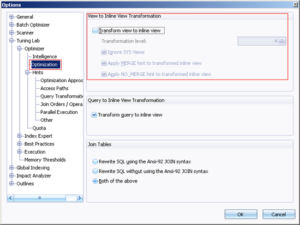
This tip sheds some insight on why the SQL optimization process can take hours to run and what you can do to shorten the process. SQL Statement with Views When the SQL statement is using Views inst...